
I really enjoy taking photos, and have recently heard that you can tag photos to show where they have been taken on a map. How do I do that?
This came up while i was speaking to Camille who is taking a photography course at the moment. The short answer is, yes, you have heard correctly. Photos can be tagged with the coordinates where they were taken, a process called Geocoding, and it’s not that hard, once the coordinates exist, to display them on a map. The techniques use the header on an image, that can store all sorts of meta information about the photo. There are a couple of options how this can be done.
The simplest way, it to have a camera that is equipped with a GPS unit. These will automatically update the photo as soon as it is taken with the GPS location of the camera. This may be fine if you’re taking a photo of a nearby object, but you must keep in mind exactly what is happening, especially if you are photographing a far-away object. If you’re standing on a mountain taking a photo of a village in a valley for example, the geocoding on the photo will contain the location of the mountain where you are standing, and not of the village that shows in the photo.
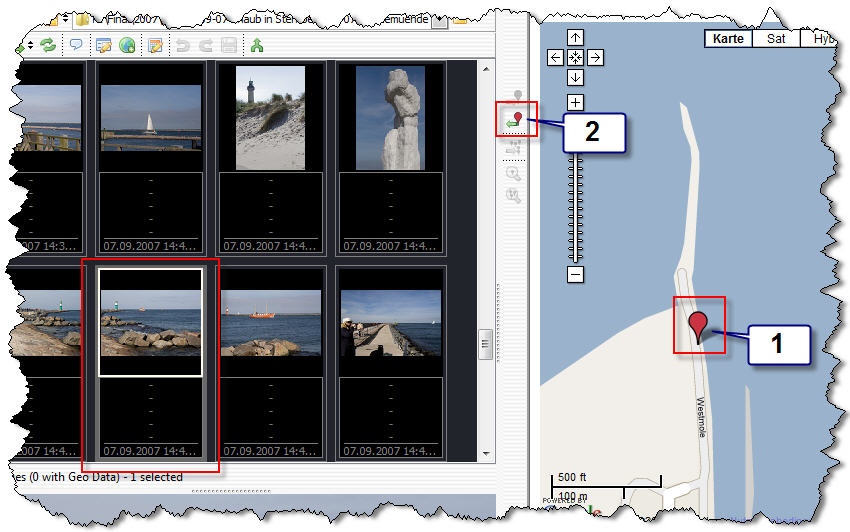
If you’re camera can’t do this, there’s software that will help you tag your photo. One good option is GeoSetter, which is a free package that lets you manually enter coordinates represented by the photo and write them to the EXIF information. All you have to do is select the photo you want to code, select a location on the map in the application and the information gets written to it. Here’s a screenshot from the application:

Once the photo has been Geocoded, this is where the fun really starts. Websites like Flickr have the ability to read Geotags and show you maps with photos on them. Check out the map function and play with some of the photos there. Give it a try but be careful you don’t get hooked.