Subscribe to my RSS feed RSS
December 7, 2008

How can I export my fonts?

  • Written by under software |
  • 1 comment so far |

I seem to have loads of fonts on my computer. Can you suggest some way I can manage them? I’m particularly interested in being able to download them and move them from one computer to another?


Here’s a cool little program you can use for just that. It’s called Cfont Pro and it’s a free program that has some cool font-related features. Besides letting you look at all your fonts, looking at a complete character map and seeing a proof sheet, it also lets you package up fonts so you can transport them from one computer to another.

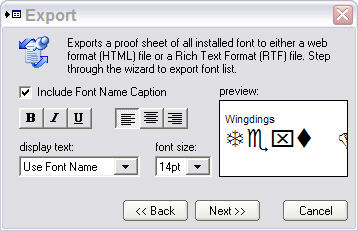
Here are some screenshots from the applications:

This is the main screen and here is the one that you can use to export your fonts.
The program also has an option to zoom into each and every character on the character map, in fact it can blow it up so large that you may need Wayfarer sunglasses to protect your eyes. Check it out.

    Related Questions

    • How do I find my old Wifi password?
      A while ago, I connected my old laptop to the Wifi router at my community centre. I would like to do the same with my new laptop, but I cannot find the Wifi password. Is it stored on my old laptop ...
    • How do I change the fonts used in forms in Firefox?
      The default font the Firefox uses for forms is Courier New, but I hate it; is there any way I can change it? Some text-entry boxes in Firefox use a fixed-space font – Courier New. It’s not the easi...
    • I don’t seem to be able to print pages in IE9. What’s wrong?
      I seem to have a problem printing in IE9. It's strange because I can print exactly the same pages from Firefox and IE8. When I try to print from IE9, the browser displays the error message: ‘script er...
Feed for this Entry | Trackback Address

1 comment so far

  1. stephanie on 12.12.2008 at 4:10 am | permalink
  2. Awesome news and i haven’t heard that there will be a tool that produces fonts and can also be changed to one system to another..

Leave a Comment

XHTML: You can use these tags: <a href="" title=""> <abbr title=""> <acronym title=""> <b> <blockquote cite=""> <cite> <code> <del datetime=""> <em> <i> <q cite=""> <strike> <strong>